

Taking over the existing network only requires changing the router’s IP address, for example from 10.10.1.1 to 10.11.1.1.
Example IPs
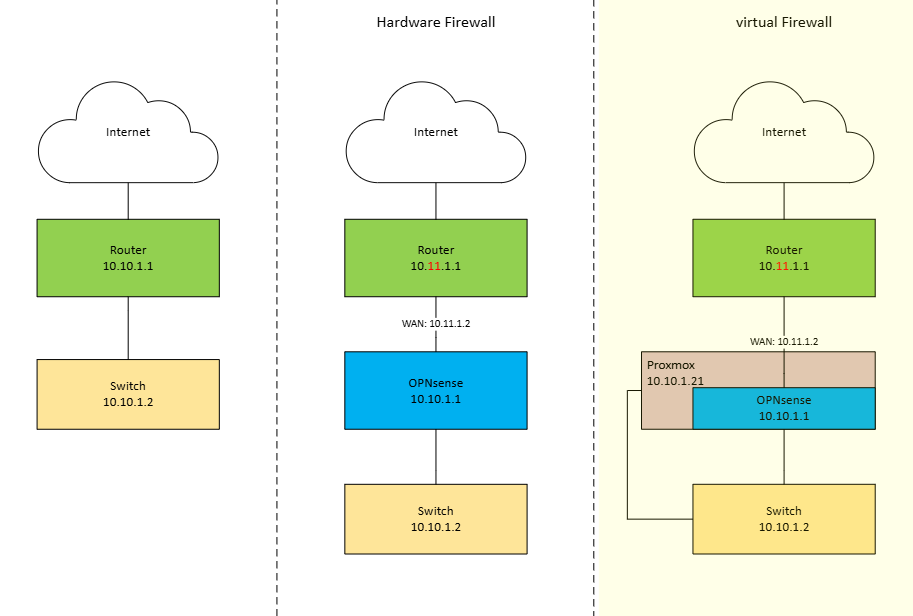
Network Evolution: From Flat Network to Virtualized Firewall
The diagram illustrates the transformation of a network architecture across three stages: a basic network without a firewall, a setup with a physical OPNsense firewall, and finally a fully virtualized OPNsense firewall running on Proxmox.
1. Existing Network (Left)
On the left side, the network operates without a dedicated firewall. The internet connection is terminated directly at a router using the subnet 10.10.1.1/24. This router forwards traffic straight to a switch, which connects all internal devices.
In this setup, routing and basic protection are handled solely by the router. There is no network segmentation, no advanced firewalling, and limited control over traffic flows between the internet and the internal network.
2. Network with Physical OPNsense Firewall (Middle)
In the middle scenario, a physical OPNsense firewall is introduced between the router and the internal network. The router now uses a separate network (10.11.1.0/24) and forwards traffic to the OPNsense firewall via 10.11.1.2 (WAN OPNsense Port).
The OPNsense firewall becomes the new gateway for the internal network (LAN) (10.10.1.1). All traffic between the internal switch and the internet must pass through OPNsense, enabling stateful firewalling, NAT, traffic inspection, and advanced security policies.
This design significantly improves security and control but requires dedicated hardware for the firewall.
3. Network with Virtualized OPNsense on Proxmox (Right)
On the right side, the physical firewall is replaced by a virtual OPNsense instance running on a Proxmox host. The router and WAN configuration remain the same, but OPNsense is now hosted as a virtual machine inside Proxmox (10.10.1.21).
Proxmox acts as the virtualization layer, connecting the WAN and LAN through virtual bridges. The OPNsense VM still serves as the default gateway (10.10.1.1) for the internal network, enforcing the same security policies as the physical firewall.
This approach combines the security benefits of OPNsense with the flexibility of virtualization, reducing hardware requirements while enabling easier backups, snapshots, and scalability.
Next step: Proxmox OPNsense config